


Dashlane Password Manager
4.520.05K Reviews
App Specs
- Version
- 6.2634.0
- Updated On
- License
- Free
- Downloads
- 5,000,000+
- Developer
- Dashlane
- Categories
- Productivity
- Platform
- Android, iOS
Screenshots
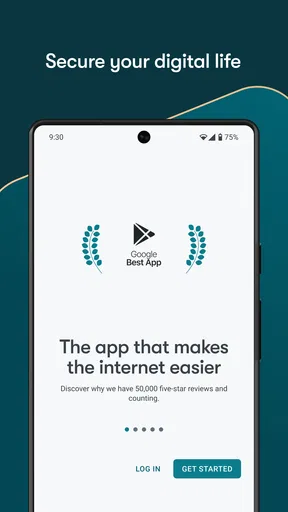
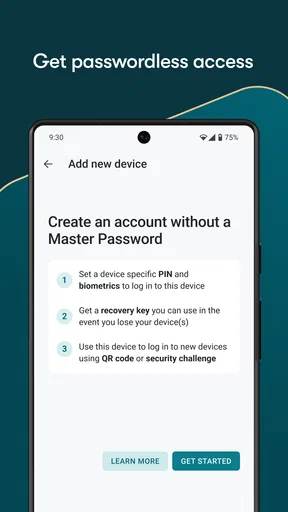
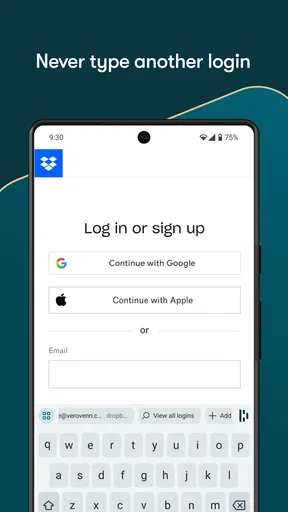
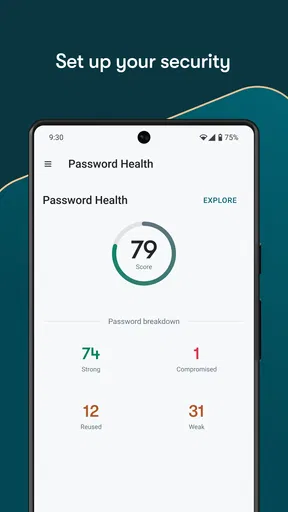
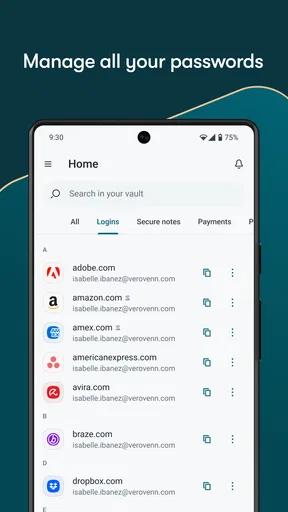
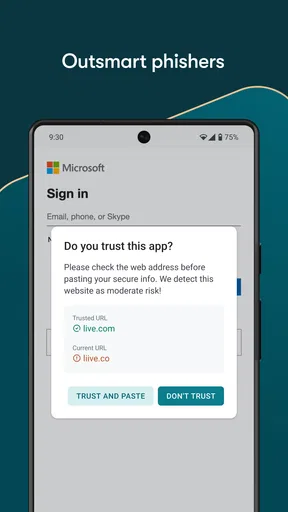
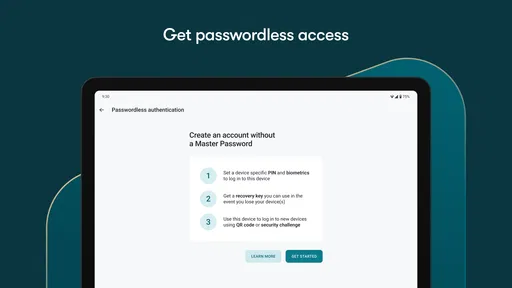
 Analysis by AppCompare
I’ve been on the hunt for a reliable password manager, and let me tell you, stumbling upon Dashlane was like finding a hidden gem in a sea of apps. If you’re anything like me, juggling a million passwords for various accounts, you’ll understand the struggle. Allow me to take you through my journey with this app, and why it might just be the solution you’ve been searching for.
First Impressions and Setup
When I first downloaded Dashlane, I was pleasantly surprised by its sleek and intuitive interface. Setting it up was a breeze. I mean, who has time for complicated setups these days, right? The app walks you through every step, ensuring you don’t miss a beat. It’s like having a tech-savvy friend guiding you along the way.
The best part? You can start using Dashlane without spending a dime. The free version offers quite a lot, which is great for anyone wanting to try it out before committing to a premium plan. It's a no-pressure situation, and I’m all for it!
Turning a Mess of Logins into a Routine
The biggest benefit is not simply having a vault; it is changing the small habits that make accounts hard to manage. I’d start by saving the accounts I use every week, then add less-used logins when they came up. That is less daunting than trying to catalog an entire digital life in one sitting. A password manager becomes useful quickly once it handles the handful of services you reach for every day.
For a realistic example, imagine paying a bill on your phone while waiting for a bus. I can open the relevant account, let autofill handle the login, and get on with the task rather than searching old notes or trying several remembered passwords. Later, when I’m on another device, syncing means I can reach the same saved information there. That handoff is the practical point: the vault should fit around the way I move between screens, not force me to remember where I last typed a password.
I’d also use the password generator at the moment an account asks me to create or change a password, rather than postponing the decision. The useful trade-off is that a strong generated password is hard to remember by design, so it only helps if I save it immediately and allow the manager to fill it later. Creating one and then copying it into a note defeats the purpose. I treat saving and testing the new login as one task: store it, sign in once, and confirm that autofill recognizes the right entry.
Features That Stand Out
Dashlane isn’t just about storing passwords; it’s a whole security ecosystem. Here’s what caught my eye:
Worth Reading Before You Choose

EA SPORTS FC Mobile 26 Is a Bigger Football Game, but It Takes Time

Flipboard Shows What News Apps Must Do Beyond the Feed

Switching to Android Auto Means Rethinking Your Driving Routine

Google Calendar Makes a Crowded Week Easier to Manage

Ludo King Makes the Most of the Minutes Between Plans

Baby Panda World Brings Quick Play to Modern Phones, but Its Game Library Feels Busy
- Password Generator: Ever been stuck trying to come up with a strong password? Dashlane’s got you covered. It creates complex passwords that’ll make hackers think twice.
- Autofill: This feature felt like magic. Whether I was shopping online or logging into social media, Dashlane filled in my credentials quicker than you can say "password." It’s like having a personal assistant for your digital life.
- VPN for Wi-Fi Protection: Yes, you read that right. Dashlane offers a VPN to keep your connection secure when you’re on public Wi-Fi. It’s like having a security guard for your internet connection.
- Dark Web Monitoring: This feature had me feeling like a cyber detective. Dashlane scans the dark web for any breaches involving your data, and alerts you if it finds anything suspicious.
Choosing What to Store and What to Change
It is tempting to think that installing a manager instantly fixes every weak or reused password. In practice, I’d treat it as a gradual cleanup. Start with email, financial accounts, and any service that can reset other passwords; those are the keys to a lot of the rest of your online life. Then change reused passwords as you encounter them. This is a more realistic workflow than taking on a huge one-time project, and it gives each new password a clear destination in the vault.
Personal information can be useful to keep alongside logins, but I would still be selective. A password manager is convenient because it gathers sensitive details in one place; that also makes choosing what belongs there a judgment call. I’d save information that helps with routine sign-ins and forms, but avoid treating the vault as a catch-all for every private document or detail. The less cluttered it is, the easier it is to spot the entry I actually need.
Passkeys add another reason to use a manager, though they are not simply another password to type. When a site offers a passkey, I’d consider whether I want that sign-in method associated with the same everyday workflow as my saved credentials. The benefit is fewer password prompts where passkeys are supported; the trade-off is that users should understand how they will access those credentials across their devices before relying on them for an important account. I would test the arrangement with a low-stakes service first.
Daily Use and Performance
Using Dashlane on a daily basis is smooth sailing. The app runs quietly in the background, ensuring your passwords are safe without any fuss. I’ve noticed that it barely uses any battery, which is a huge plus for someone who’s always on the go. The synchronization across devices is seamless, making it easy to switch from my phone to my laptop without missing a beat.
One thing I can’t stress enough is the app’s ability to simplify my digital life. I no longer have to worry about remembering dozens of passwords or the fear of getting locked out of an account. Dashlane is like that safety net you didn’t know you needed until you had it.
Moving Between Devices and People
The smoothest handoff is from phone to computer when I have already saved the login and both devices are set up to use the account. Still, I would not assume that every sign-in screen behaves identically. A site may present a different form in its app than it does in a browser, or ask for an extra verification step. If autofill misses, I’d search for the saved entry and copy the needed detail rather than repeatedly tapping at a form that is not responding as expected.
For a shared household or small team, a personal vault should not be treated as a casual substitute for a deliberate sharing arrangement. Before putting a joint account into one person’s manager, decide who needs access and how access will be recovered if that person changes devices or leaves. That conversation matters more than the convenience of a quick handoff. If shared access is the main reason you are shopping for a password manager, compare the current account options carefully before moving everything over.
Dashlane is a better fit for people who want a dedicated manager than for someone who only needs to remember a few low-risk logins. Many phones and browsers include built-in password saving, and that can be enough if you stay within one ecosystem and want the simplest possible setup. A separate manager makes more sense when you regularly switch devices or browsers, want passkeys and personal information organized with logins, or prefer a purpose-built place to manage credentials. The extra layer is worthwhile only if you will actually use it.
Where Convenience Needs a Backup Plan
Autofill is helpful, but I would not make it the only way I know how to reach important accounts. A changed device, an unexpected sign-in challenge, or a site that does not cooperate can interrupt the usual flow. I’d make sure I understand how to access my Dashlane account and keep the recovery details somewhere safe and separate from the vault. That small bit of preparation is easy to overlook when everything is working normally.
There is also a learning curve in deciding when to let the manager fill a login and when to pause and check the account name. If two entries look similar, choosing the wrong one can waste time or put credentials into the wrong place. I find it worth giving entries clear names as I save them, especially for personal and work accounts on the same service. This simple habit makes later searches more dependable and reduces the chance of confusing a familiar login with an older one.
Dashlane is free to begin with, while in-app purchases range from about $3.49 to $194.99 per item. I’d use the free experience to decide whether its workflow suits me before paying for anything, and check the current plan details in the app before choosing. The right value depends on whether the features and account arrangement match my needs, not on how many tools a plan appears to offer. If I only want basic password saving on one device, a built-in manager may be the more sensible choice.
A More Measured Look at the Security Extras
The VPN and dark web monitoring make the app sound broader than a basic password vault, but I would not treat either as a reason to stop using ordinary caution. A VPN can be useful on public Wi-Fi, yet it does not make every website trustworthy or protect me from entering credentials on a fake page. Monitoring can draw attention to exposed information, but an alert still leaves me with practical work: change the affected password, check whether I reused it, and secure any account that depends on it.
That distinction is important because security tools are most useful when they lead to a good next step. If I receive a breach warning, I’d go to the service through its usual app or by entering its address myself, then update the login saved in Dashlane and review other accounts where I might have reused the old password. I would not follow an unfamiliar message simply because it claims to be a security alert. The manager helps organize the response; it cannot make the decision for me.
Who I’d Recommend It To
I’d recommend Dashlane to someone who has accounts spread across a phone and a computer and is ready to stop reusing easy-to-remember passwords. It is especially useful for people who routinely sign in to shopping, email, banking, travel, or work services and want a consistent place to manage those credentials. The password generator is most valuable when paired with the habit of saving each new login right away, while syncing matters to anyone who does not live on a single device.
I would skip it, at least for now, if I had very few accounts, rarely changed devices, and felt comfortable with the password manager already built into my browser or phone. I’d also hesitate if I did not want another account to maintain or was unwilling to spend a little time learning the autofill and recovery workflow. A manager can reduce password-related friction, but it cannot remove the need to protect access to the manager itself.
How It Fits Among Password Managers
Compared with a browser’s built-in password saving, Dashlane feels like a more intentional home for credentials and related personal information, particularly when I move between devices. Built-in tools can be convenient and perfectly adequate for people who mainly use one browser or phone brand. A dedicated app becomes more attractive when I want a consistent routine beyond that single environment. The trade-off is another service and interface to learn, so I would not switch simply because a standalone manager sounds more serious.
Against other dedicated password managers, the decision is less about the basic idea of saving passwords and more about which workflow feels natural, which plan fits, and how well the app matches the devices and accounts I use. I would compare supported features and current plan terms rather than assume every manager handles passkeys, syncing, or sharing in the same way. Dashlane’s appeal is its combination of everyday credential management with additional security tools; someone who wants only a minimal vault may prefer a simpler alternative, while someone who needs a specific sharing or account setup should verify that requirement before importing a large collection.
Overall Experience
In all honesty, Dashlane has been a game-changer for me. It’s more than just a password manager; it’s a comprehensive security tool that gives you peace of mind. Whether you’re tech-savvy or just someone looking for an easy way to manage passwords, Dashlane is worth a shot.
So, if you’re tired of the password juggling act, give Dashlane a spin. It might just be the app you didn’t know you needed. Trust me, your future self will thank you.
Dashlane is a productivity app from Dashlane, released on August 23, 2012, and its current version is 6.2607.1. It is rated for Everyone and requires Android 10 or later. Its average rating is 4.5 from around 238,000 ratings, with roughly 20,000 written reviews and over 5 million installs. Those figures suggest that it is an established option, but they do not tell me whether its particular workflow will suit you; that is why I’d start by testing the everyday sign-ins I rely on most.
My bottom line is that the app works best when I treat it as a habit, not a one-time download: save a login when I create it, use generated passwords for important accounts, and periodically act on security alerts instead of assuming the tools have handled everything. That routine makes the benefits tangible without pretending that any manager can remove every risk or every point of friction. If that balance sounds right, Dashlane is an easy one to try; if simplicity and staying inside one device ecosystem matter more, the built-in option may be enough.
Pros
- User-friendly interface and design.
- Supports multiple platforms seamlessly.
- Strong encryption for data protection.
- Secure password sharing feature.
- Dark web monitoring included.
Cons
- Premium features can be pricey.
- Limited free version capabilities.
- Occasional sync issues reported.
- No emergency access feature.
- Requires internet for full functionality.
FAQs for Dashlane Password Manager
What platforms is Dashlane Password Manager available on?
Dashlane Password Manager is available on multiple platforms, including Android, iOS, Windows, and macOS. This cross-platform compatibility ensures that you can access your passwords and secure notes from virtually any device you use. The app also offers browser extensions for Chrome, Firefox, Edge, and Safari, making it convenient for users who frequently switch between devices and operating systems.
How does Dashlane ensure the security of my passwords?
Dashlane uses AES-256 encryption, one of the strongest encryption protocols available, to protect your data. Your master password, which is not stored on Dashlane's servers, is the key to decrypting your data locally on your device. This means that even if Dashlane's servers were compromised, your passwords would remain secure. Additionally, Dashlane offers features like dark web monitoring and VPN for added security.
Can I use Dashlane to store more than just passwords?
Yes, Dashlane allows you to store a variety of personal information securely. In addition to passwords, you can save secure notes, payment information, and personal details like addresses and ID numbers. This makes Dashlane a comprehensive digital wallet and secure vault, helping you manage all your sensitive information in one place, accessible only to you.
Is Dashlane free to use, and what features are included in the free version?
Dashlane offers a free version that includes basic password management features, such as storing up to 50 passwords on one device and basic form autofill. However, for more advanced features like unlimited password storage, dark web monitoring, VPN, and cross-device sync, you would need to upgrade to one of their premium plans. The free version is a great way to get started with Dashlane.
How user-friendly is Dashlane for beginners?
Dashlane is designed with user-friendliness in mind, making it suitable for beginners. The app offers an intuitive interface with easy navigation and straightforward setup. New users are guided through the initial setup with clear instructions, and the app provides helpful tips and tutorials. Additionally, Dashlane's customer support and extensive help resources are available to assist users with any questions or issues.


